Thursday, October 1, 2020

NodeMCU - Enabling Lua 5.3

I could write this as a 1 line post, but I'm going to pad it out a little.

So, if you've ever used Lua on a NodeMCU device, like an ESP-8266, you know that it defaults to Lua 5.1. Not that there is anything wrong with that, but if you read the whitepaper, you'll see that 5.3 has some neat features. But the question I couldn't find the answer to is: How do you cause the project to compile with Lua 5.3.

Sunday, June 16, 2019

Easy IOT with ESP8266 and MicroPython using sockets instead of HTML

The problem I've always had with the ESP8266 was that all of the examples showed wrapping the controls in HTML. So - you'll start up a small web server, then decode the GET from the client and run your control logic from there. I don't like that.

I can see certain advantages, if you want to manually control your outputs from your browser, and you want to actually see the state of your inputs, it's great. Have at it. But I don't want to do that - at least not all  of the time. I want an easy way to read the inputs and control the outputs without having to log in with a browser or use some funky CURL.

Friday, October 27, 2017

Monitoring My Pi Cluster WIth Nagios, Part III - Checking the other Pi's using check_by_ssh


It's been too long since I wrote my other Nagios posts. The server I had running died, and I didn't recover the nagios files from it. Fortunately, I had an AWS machine to compare to, so I didn't lose everything.

Setting up the check_by_ssh checks is, like all of nagios (it seems), a multi-config process. You'll need to modify $NAGIOS_HOME/etc/objects/commands.cfg, $NAGIOS_HOME/etc/nagios.cfg, and $NAGIOS_HOME/etc/servers/<server_name>.


Wednesday, August 23, 2017

Monitoring My Pi Cluster WIth Nagios, Part II - Adding the Pi's

In Part 1, I compiled Nagios from source, installed it and got it running.

Here,  I'm going to describe how I added my Pi's.


Friday, August 18, 2017

Monitoring My Pi Cluster WIth Nagios, Part 1 - Installing

This will hopefully be Part 1 of the story. BTW - It seems to be pronounced Nah - gee (as in geese) - ose. I installed this on a pine64 to monitor my Pi network (4- Pi3s with MySQL5.7 servers, and 1 Pi2 running Zookeeper) and to learn how to use it.

I know this is going to be like "somebody who's played racquetball 3 times teaching someone else to play for the first time", but here goes:

HT RiffTrax Ator the Fighting Eagle 

Sunday, August 13, 2017

Pinebook: Installing Armbian

I just got my Pinebook last week. If you don't know what a Pinebook is: here. I have a couple of pine64's and they are pretty cool. I'm using them as servers, and not using the GPIO or Euler Bus. But the Pinebook is different.

Disclaimer: If you brick your Pinebook, I'm sorry - this is just how I installed Armbian on mine.

Thursday, March 9, 2017

Using dhclient to automatically change IP addresses of Raspberry Pi on start-up

So, in my previous post I dealt with changing IP addresses on my Pi cluster by scp'ing the new IP addresses after the Pi had started up and established a network, and creating an ssh/config file from that info.

This is fine for most occasions. But I have one instance set-up to run zookeeper. I'd have to go around and change the config files on all my other Pi's. Ansible could cure this, and I'll get there one of these days. But I'm not there today. And actually - I think I'll use the script I wrote previously to update ansibles' hosts file. I just now thought of that.

Anyway - I want the zookeeper Pi to always have the same address.

One way to deal with changing IP addresses on my raspberry Pi cluster

One of the annoyances I have with my router (it's actually a hotspot) is that every time I start up my Pi cluster, they all have different IP addresses than they had the day before.

So - I have two ways to deal with this.

The first way - I scp the IP addresses as a file (after the pi's start up) to my work computer, then generate an ssh_config file. The second way, I request the same IP from my hotspot. All my Pi's are running Debian Jessie with systemd.

The first way: 

scp (or you could email it) the IP address after networking has started up.

Saturday, January 28, 2017

HOW-TO use Kafka to stream Postgresql traffic with bottledwater_pg on a Raspberry Pi 3

If you want to stream changes to your Postgresql database to Kafka on your Raspberry Pi 3 - this is how I did it. I'm sure there are other ways to accomplish this. All I want to do here is to show you how I managed it. I'll preface my comments with a hash '#'.

Installing the C AVRO library on Raspbian Jessie

Reference: Apache Avro

git clone https://github.com/apache/avro.git

Install postgresql from source an Raspberry Pi 3 Debian Jessie

Reference: https://www.postgresql.org/docs/current/static/installation.html

Pretty sure I included all of the prerequisites:

Install zookeeper package

As part of the Kafka streaming project, I installed zookeeper. Here's how I did that:

Ref: Apache Zookeeper

Friday, June 26, 2015

Changing Out a Zookeeper Instance - Rolling restart

Changing Out a Zookeeper Instance:

We were recently tasked with changing out 3 (of 5) Zookeeper instances without disrupting the customer's environment. I set up a test bed using 5 independent zookeeper instances with a simulated game running on another.

Tuesday, December 3, 2013

Using my IPAD as an extended display using AirDisplay.

Using my IPAD as an extended display using AirDisplay.

I couldn't use AirDisplay at McDonald's or Starbuck's. The wi-fi blocked local traffic. So - this is my work-around.

In a nutshell:
  • Enabled Bluetooth on both and connected my IPAD to my Mac.
  • Started AirDisplay on both and connected.
  • When it started up, my Mac's display shrunk to the size of my IPAD. 
    • System preferences (on my Mac)
    • Displays
    • Arrangement - un-check 'Mirror Displays' and position the small window.

Sunday, February 10, 2013

Gentoo and Citrix

This is how I set-up icaclient to access Ajubeo, which uses a Citrix ZenApp server.

First, of course, was to emerge net-misc/icaclient. The only applicable USE flag was nsplugin. I don't know if it is necessary or not, but I used it for gnash and Icedtea. So "echo "net-misc/icaclient nsplugin" >> /etc/portage/package.use/package.use

Then, of course, I added the file to package.keyword with ~amd64. Emerge then tells you that you have to go the Citrix website. The message, from elogv: │Download the client RPM file x86? ( ICAClient-12.1.0-0.i386.rpm )
│        amd64? ( ICAClient_12.1.0-0.x86_64.rpm ) from
│&http://www.citrix.com/English/ss/download/details.asp?downloadId=2323812&productId=1689163 │
and place it in /usr/portage/distfiles.

Once you do that, you can emerge again, and it will extract the rpm, putting everything into /opt/Citrix. Unfortunately, this is not the end of my story.
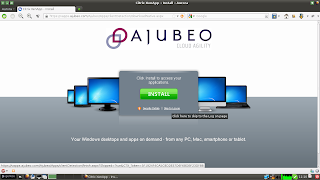
Choose <skip to logon>
I already had a username and password, so if you don't - you're on your own here.


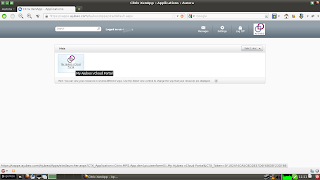
Click on the link for the VCloud Portal - which is really a link for the ica client.

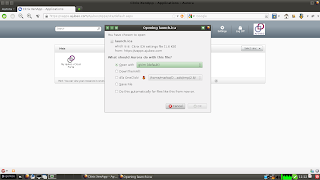
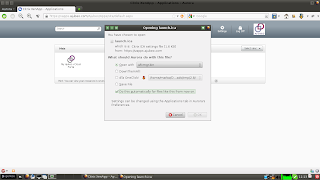
Firefox didn't know how to handle launch.ica. So, I chose open with, and selected "other"

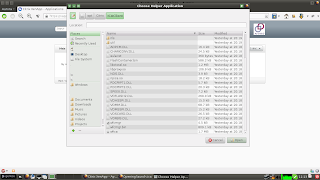
Then, I navigated to /opt/Citrix/ICAClient/

And selected 'wcfmgr.bin'. I also chose to "Do this automatically..."

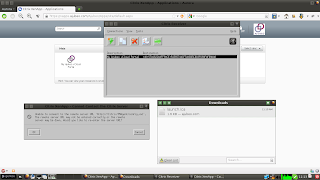
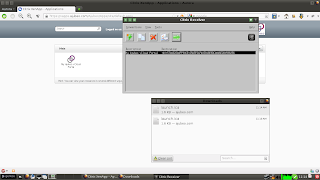
It's still a little cranky. And when I chose to cancel the warning about being unable to connect..

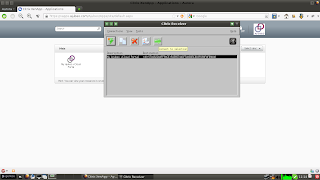
And tried to connect anyway...

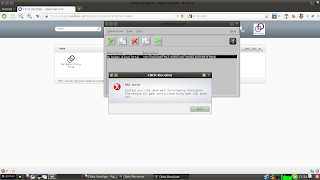
I was rewarded with an SSL error.

This time I tried clicked ok on the "Unable to connect.." warning and then clicked on the <Arrow> connect to selection button. Bingo

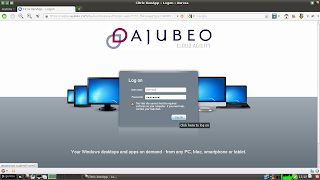
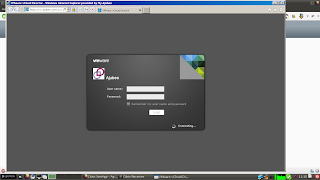
Ajubeo's login page.

Ajubeo has a great site, and I can't wait to dig into it. I just had to get past this first hurdle.

Saturday, December 1, 2012

Linux Basics

I thought I knew something about Linux. All confident in my knowledge. But I didn't know Jack - still don't. But as I was reading the LPIC (Linux Professional Institute Certification) Study Guide I learned a lot. A LOT! Holy moly that book kicks ass. Now I just want to share a little of what I learned.

Friday, October 26, 2012

Gentoo On My HP Part 3

Things are going pretty well. Not well enough for me to change my GRUB2 default yet... Well, I guess I could.

But I did run across some curious problems and their solutions. The first was starting X via xdm (instead of startx). SLiM would just get stuck - not starting anything but what looked like a twm session (less terminal window). When I made xdm be the default display manager by editing /etc/conf.d/xdm and changing DISPLAYMANAGER="slim" to "xdm", the result was a loop of xdm trying to start "LXDE" but just kicking it back to the login screen.

Checking /var/log/xdm.log yields
xdm error (pid 2441): Dbus error: Unable to open session: Failed to connect to socket /var/run/dbus/system_bus_socket: No such file or directory
xdm error (pid 2441): console-kit-daemon not running?
The solution was to add dbus to the default runlevel and restart. rc-update add dbus default They left that out of the manuals, I guess because dbus got pulled in by something else - not sure what.

As a bonus to adding dbus to the default runlevel, my MP3 player is now auto-mounted when I plug it in. (At least) Two birds with one stone!

Also, I emerged the "murrine" packages - and that cleared up most of my icon problems. x11-themes/murrine-themes and x11-themes/gtk-engines-murrine

Thursday, October 25, 2012

Gentoo on my HP - Continued

I'm pretty sure that I got lucky when I configured the sound on this thing. It didn't work at first, but I'm sure that it's because I didn't have the right flags in make.conf. When I installed pysolfc, the sound worked and I'm pretty sure I did that before messing with the sound configuration in the kernel. And all I did there was to compile it as modules so I could figure out which ones I needed and which ones I didn't.

I had written a bunch of simple scripts for my Dell that I sure miss now. Some of them I rewrote - the really easy ones like the one to watch the progress of the emerge or the progress of the fetch. "tail -f /var/log/emerge.log" - easy, like I said, but I always forget where they put the emerge.log - so it comes in handy. I had a really cool one that backed up imo important files like /usr/src/linux/.config and /etc/conf.d and stuff like that and tacked the date onto it. Now I'll have to figure out how to do that again.

Sunday, October 21, 2012

Gentoo on my HP2000-425NR

Well, my Dell died :-( May it rest in peace. So I bought the cheapest good machine I could find, or maybe the best cheap machine - which turned out to be a HP-2000. Memory was on sale, so I got an extra 4G.

Specs:
AMD E300 1.3 GHz processor.
6GB Ram
320GB Hard Drive
Ralink RT5390 Wireless
ATI Technologies Inc AMD Radeon HD 6310 GraphicsATI
ATI Technologies Inc SBx00 Azalia (Intel HDA) (rev 40)

Installing Linux has proven problematic.

Friday, February 17, 2012

A cheesy application to check for new podcasts and transfer them to my Walkman

#! /usr/bin/env python

""" Version 0.02.02
        Just a simple file manipulation tool.
        Used in this instance as a Podcast updater.
        Still stuff to do - see TODO file"""

import sys, os, time, stat, shutil
import tkFileDialog, ttk, tkMessageBox
from Tkinter import *